Here are the useful ways to remove multiple elements or duplicate values from an array:
Remove Multiple Elements (by index using splice())
<!DOCTYPE html>
<html>
<head>
	<meta charset="utf-8">
	<meta name="viewport" content="width=device-width, initial-scale=1">
	<title>How to Remove Multiple Elements or Duplicate Values from Array in JavaScript?</title>
	<script src="https://cdnjs.cloudflare.com/ajax/libs/jquery/3.7.1/jquery.min.js"></script>
</head>
<body>

<script>
	var cityArray = ["Patna", "Bhopal", "Bangalore", "Mumbai", "Chennai"];

	// Remove 2 elements starting from index 1
	cityArray.splice(1, 2);

	console.log(cityArray);
</script>
</body>
</html>
Output:
[ "Patna", "Mumbai", "Chennai" ]

Description:
1: starting index2: number of elements to remove- Removes Bhopal and Bangalore from the array
Remove Multiple Values (using filter())
<!DOCTYPE html>
<html>
<head>
	<meta charset="utf-8">
	<meta name="viewport" content="width=device-width, initial-scale=1">
	<title>How to Remove Multiple Elements or Duplicate Values from Array in JavaScript?</title>
	<script src="https://cdnjs.cloudflare.com/ajax/libs/jquery/3.7.1/jquery.min.js"></script>
</head>
<body>

<script>
	var cityArray = ["Patna", "Bhopal", "Bangalore", "Mumbai", "Bhopal", "Chennai"];

	// Remove all "Bhopal"
	cityArray = cityArray.filter(function(item) {
	    return item !== "Bhopal";
	});

	console.log(cityArray);
</script>
</body>
</html>
Output:
[ "Patna", "Bangalore", "Mumbai", "Chennai" ]
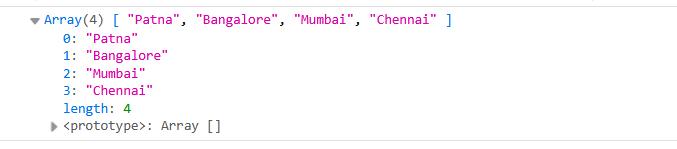
Description:
- Removes all elements that match a given condition
- Useful for removing items based on specific criteria or logic
Remove Duplicate Values (keep unique items)
<!DOCTYPE html>
<html>
<head>
	<meta charset="utf-8">
	<meta name="viewport" content="width=device-width, initial-scale=1">
	<title>How to Remove Multiple Elements or Duplicate Values from Array in JavaScript?</title>
	<script src="https://cdnjs.cloudflare.com/ajax/libs/jquery/3.7.1/jquery.min.js"></script>
</head>
<body>

<script>
	var cityArray = ["Patna", "Bhopal", "Bangalore", "Mumbai", "Bhopal", "Chennai", "Mumbai"];

	// Remove duplicates
	var uniqueArr = [...new Set(cityArray)];

	console.log(uniqueArr);
</script>
</body>
</html>
Output:
[ "Patna", "Bhopal", "Bangalore", "Mumbai", "Chennai" ]
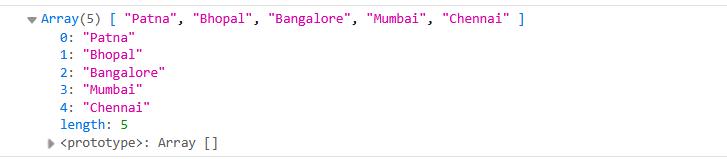
Description:
- A
Setautomatically removes duplicate values - The
...(spread operator) converts theSetback into an array - The result contains only unique values
Summary:
splice(): removes multiple elements by indexfilter():removes multiple elements based on value or conditionSet:easily removes duplicate values