Below are some examples of how we can remove objects from an array using methods like filter(), splice(), and findIndex() based on different conditions and use cases.
Remove Object by Property Value (using filter())
<!DOCTYPE html>
<html>
<head>
	<meta charset="utf-8">
	<meta name="viewport" content="width=device-width, initial-scale=1">
	<title>How to Remove Objects from an Array in jQuery?</title>
	<script src="https://cdnjs.cloudflare.com/ajax/libs/jquery/3.7.1/jquery.min.js"></script>
</head>
<body>

<script>
	var cities = [
	    { id: 1, name: "Patna", state: "Bihar" },
	    { id: 2, name: "Gaya", state: "Bihar" },
	    { id: 3, name: "Bangalore", state: "Karnataka" },
	    { id: 4, name: "Bhopal", state: "Madhya Pradesh" },
	    { id: 5, name: "Agra", state: "Utter Pradesh" },
	    { id: 6, name: "Kanpur", state: "Utter Pradesh" },
	    { id: 7, name: "Kannur", state: "Kerala" },
	];

	// Remove city with id = 2
	cities = cities.filter(function(city) {
	    return city.id !== 2;
	});

	console.log(cities);
</script>
</body>
</html>
Output:
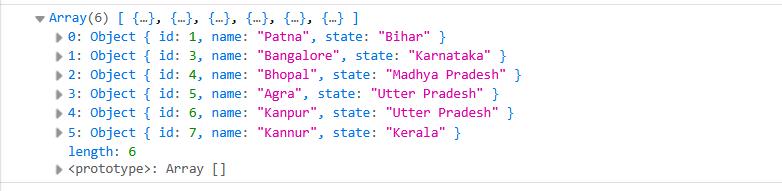
Description:
filter()iterates through each object in the array- It retains only the objects that do not match the given condition
- It is the most commonly used and recommended method for this purpose
Remove Object by Index (using splice())
<!DOCTYPE html>
<html>
<head>
	<meta charset="utf-8">
	<meta name="viewport" content="width=device-width, initial-scale=1">
	<title>How to Remove Objects from an Array in jQuery?</title>
	<script src="https://cdnjs.cloudflare.com/ajax/libs/jquery/3.7.1/jquery.min.js"></script>
</head>
<body>

<script>
	var cities = [
	    { id: 1, name: "Patna", state: "Bihar" },
	    { id: 2, name: "Gaya", state: "Bihar" },
	    { id: 3, name: "Bangalore", state: "Karnataka" },
	    { id: 4, name: "Bhopal", state: "Madhya Pradesh" },
	    { id: 5, name: "Agra", state: "Utter Pradesh" },
	    { id: 6, name: "Kanpur", state: "Utter Pradesh" },
	    { id: 7, name: "Kannur", state: "Kerala" },
	];

	// Remove object at index 1
	cities.splice(1, 1);

	console.log(cities);
</script>
</body>
</html>
Output:
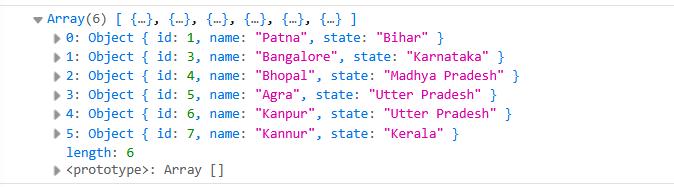
Description:
- Removes an object based on its position in the array
- Directly modifies the original array
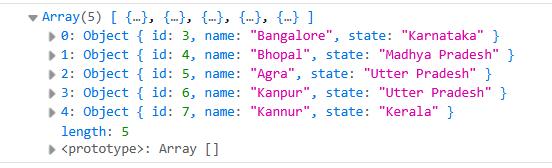
Remove Multiple Objects (by condition)
<!DOCTYPE html>
<html>
<head>
	<meta charset="utf-8">
	<meta name="viewport" content="width=device-width, initial-scale=1">
	<title>How to Remove Objects from an Array in jQuery?</title>
	<script src="https://cdnjs.cloudflare.com/ajax/libs/jquery/3.7.1/jquery.min.js"></script>
</head>
<body>

<script>
	var cities = [
	    { id: 1, name: "Patna", state: "Bihar" },
	    { id: 2, name: "Gaya", state: "Bihar" },
	    { id: 3, name: "Bangalore", state: "Karnataka" },
	    { id: 4, name: "Bhopal", state: "Madhya Pradesh" },
	    { id: 5, name: "Agra", state: "Utter Pradesh" },
	    { id: 6, name: "Kanpur", state: "Utter Pradesh" },
	    { id: 7, name: "Kannur", state: "Kerala" },
	];

	// Remove all cities where the state is "Bihar"
	cities = cities.filter(function(city) {
	    return city.state !== "Bihar";
	});

	console.log(cities);
</script>
</body>
</html>
Remove Object using Arrow Function
<!DOCTYPE html>
<html>
<head>
	<meta charset="utf-8">
	<meta name="viewport" content="width=device-width, initial-scale=1">
	<title>How to Remove Objects from an Array in jQuery?</title>
	<script src="https://cdnjs.cloudflare.com/ajax/libs/jquery/3.7.1/jquery.min.js"></script>
</head>
<body>

<script>
	var cities = [
	    { id: 1, name: "Patna", state: "Bihar" },
	    { id: 2, name: "Gaya", state: "Bihar" },
	    { id: 3, name: "Bangalore", state: "Karnataka" },
	    { id: 4, name: "Bhopal", state: "Madhya Pradesh" },
	    { id: 5, name: "Agra", state: "Utter Pradesh" },
	    { id: 6, name: "Kanpur", state: "Utter Pradesh" },
	    { id: 7, name: "Kannur", state: "Kerala" },
	];

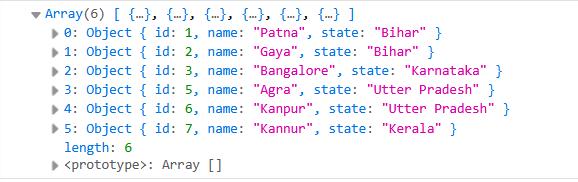
	cities = cities.filter(city => city.id !== 4);

	console.log(cities);
</script>
</body>
</html>
Output:
Summary:
filter(): best for removing objects based on a conditionsplice(): best for removing objects using index position- In most real-world cases,
filter()is the preferred approach