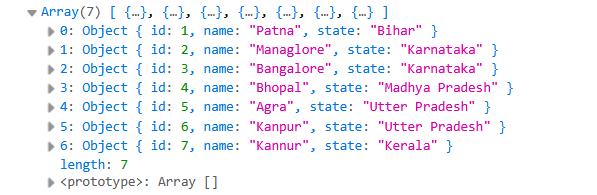
Below are some examples of how you can update objects inside an array:
Update object by property using map()
The map() method creates a new array with the updated object instead of modifying the original array.
<!DOCTYPE html>
<html>
<head>
	<meta charset="utf-8">
	<meta name="viewport" content="width=device-width, initial-scale=1">
	<title>How to Update an Object Inside an Array in JavaScript?</title>
	<script src="https://cdnjs.cloudflare.com/ajax/libs/jquery/3.7.1/jquery.min.js"></script>
</head>
<body>

<script>
	var cities = [
	    { id: 1, name: "Patna", state: "Bihar" },
	    { id: 2, name: "Gaya", state: "Bihar" },
	    { id: 3, name: "Bangalore", state: "Karnataka" },
	    { id: 4, name: "Bhopal", state: "Madhya Pradesh" },
	    { id: 5, name: "Agra", state: "Utter Pradesh" },
	    { id: 6, name: "Kanpur", state: "Utter Pradesh" },
	    { id: 7, name: "Kannur", state: "Kerala" },
	];

	// Update name where id = 2
	cities = cities.map(function(city) {
	    if (city.id === 2) {
	        city.name = "Arah";
	    }
	    return city;
	});

	console.log(cities);
</script>
</body>
</html>
Output:
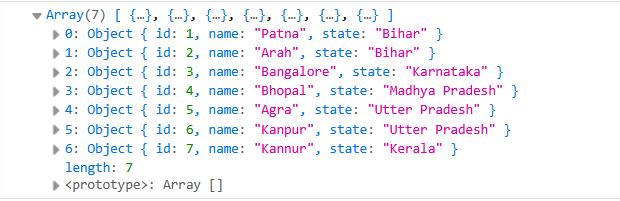
Description:
map()iterates through all objects in the array- It identifies the matching object (e.g.,
id === 2) - Updates the required property of that object
- Returns a new array with the updated values
Update object (clean ES6 approach)
<!DOCTYPE html>
<html>
<head>
	<meta charset="utf-8">
	<meta name="viewport" content="width=device-width, initial-scale=1">
	<title>How to Update an Object Inside an Array in JavaScript?</title>
	<script src="https://cdnjs.cloudflare.com/ajax/libs/jquery/3.7.1/jquery.min.js"></script>
</head>
<body>

<script>
	var cities = [
	    { id: 1, name: "Patna", state: "Bihar" },
	    { id: 2, name: "Gaya", state: "Bihar" },
	    { id: 3, name: "Bangalore", state: "Karnataka" },
	    { id: 4, name: "Bhopal", state: "Madhya Pradesh" },
	    { id: 5, name: "Agra", state: "Utter Pradesh" },
	    { id: 6, name: "Kanpur", state: "Utter Pradesh" },
	    { id: 7, name: "Kannur", state: "Kerala" },
	];

	// Update name where id = 2
	cities = cities.map(city =>
	    city.id === 2 ? { ...city, name: "Arah" } : city
	);

	console.log(cities);
</script>
</body>
</html>
Output:
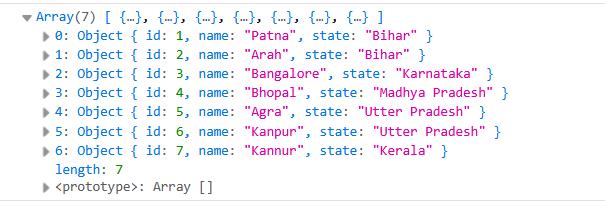
Description:
- The
...citysyntax copies the existing object - Only the
nameproperty is updated - Keeps the code clean and maintains immutability
Update Multiple Fields
You can update more than one property at a time.
<!DOCTYPE html>
<html>
<head>
	<meta charset="utf-8">
	<meta name="viewport" content="width=device-width, initial-scale=1">
	<title>How to Update an Object Inside an Array in JavaScript?</title>
	<script src="https://cdnjs.cloudflare.com/ajax/libs/jquery/3.7.1/jquery.min.js"></script>
</head>
<body>

<script>
	var cities = [
	    { id: 1, name: "Patna", state: "Bihar" },
	    { id: 2, name: "Gaya", state: "Bihar" },
	    { id: 3, name: "Bangalore", state: "Karnataka" },
	    { id: 4, name: "Bhopal", state: "Madhya Pradesh" },
	    { id: 5, name: "Agra", state: "Utter Pradesh" },
	    { id: 6, name: "Kanpur", state: "Utter Pradesh" },
	    { id: 7, name: "Kannur", state: "Kerala" },
	];

	// Update name and state where id = 2
	cities = cities.map(city => {
	    if (city.id === 2) {
	        return {
	            ...city,
	            name: "Managlore",
	            state: "Karnataka"
	        };
	    }
	    return city;
	});

	console.log(cities);
</script>
</body>
</html>
Output:
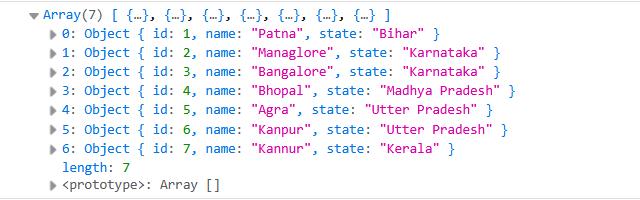
Description:
- An array of city objects is defined with properties like
id,name, andstate - The
map()method is used to loop through each object in the array - It checks for the object where
id === 2 - For the matching object, a new object is returned using the spread operator (
...city) - The
nameandstatevalues are updated while keeping other properties unchanged - All other objects are returned without any changes
- The result is a new array where only the selected object is updated
Update an Object by Searching with find()
Use find() when you want to update an object based on a specific property value.
<!DOCTYPE html>
<html>
<head>
	<meta charset="utf-8">
	<meta name="viewport" content="width=device-width, initial-scale=1">
	<title>How to Update an Object Inside an Array in JavaScript?</title>
	<script src="https://cdnjs.cloudflare.com/ajax/libs/jquery/3.7.1/jquery.min.js"></script>
</head>
<body>

<script>
	var cities = [
	    { id: 1, name: "Patna", state: "Bihar" },
	    { id: 2, name: "Mysuru", state: "Karnataka" },
	    { id: 3, name: "Bangalore", state: "Karnataka" },
	    { id: 4, name: "Bhopal", state: "Madhya Pradesh" },
	    { id: 5, name: "Agra", state: "Utter Pradesh" },
	    { id: 6, name: "Kanpur", state: "Utter Pradesh" },
	    { id: 7, name: "Kannur", state: "Kerala" },
	];

	var city = cities.find(function(item) {
	  return item.id === 2;
	});

	if (city) {
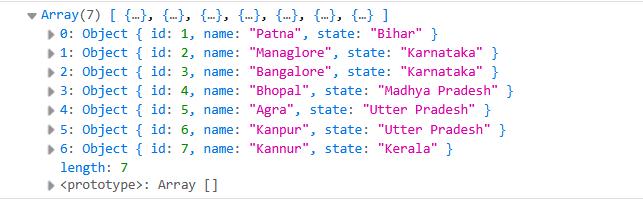
	  city.name = "Managlore";
	}

	console.log(cities);
</script>
</body>
</html>
Output:
Update an Object Using findIndex()
If you need the object's position before updating it, use findIndex().
<!DOCTYPE html>
<html>
<head>
	<meta charset="utf-8">
	<meta name="viewport" content="width=device-width, initial-scale=1">
	<title>How to Update an Object Inside an Array in JavaScript?</title>
	<script src="https://cdnjs.cloudflare.com/ajax/libs/jquery/3.7.1/jquery.min.js"></script>
</head>
<body>

<script>
	var cities = [
	    { id: 1, name: "Patna", state: "Bihar" },
	    { id: 2, name: "Mysuru", state: "Karnataka" },
	    { id: 3, name: "Bangalore", state: "Karnataka" },
	    { id: 4, name: "Bhopal", state: "Madhya Pradesh" },
	    { id: 5, name: "Agra", state: "Utter Pradesh" },
	    { id: 6, name: "Kanpur", state: "Utter Pradesh" },
	    { id: 7, name: "Kannur", state: "Kerala" },
	];

	var index = cities.findIndex(function(item) {
	  return item.id === 2;
	});

	if (index !== -1) {
	  cities[index].name = "Managlore";
	}

	console.log(cities);
</script>
</body>
</html>
Output: